
Guide / scanning on the floor
Mobile barcode scanning: the terminal you already own
The camera in a pocket phone replaced the scanning terminal for most SMEs. Here is how mobile scanning works, what it is good at, and where a desk scanner still wins.
The short answer
- Any modern phone is a barcode and QR scanner — the camera reads the codes; the browser writes the record.
- The three mobile workflows: receiving against purchase orders, picking against orders, counting stocktakes — all thumb-sized.
- What mobile replaces: dedicated terminals and their charging docks, for volumes most SMEs never reach.
- Where the desk wins: high-volume bench entry, where a keyboard-wedge scanner is faster than any camera.
- BSimple scans through the mobile browser — nothing to install — included from $180/month (AUD).
- 01The short answer
- 02How mobile scanning actually works
- 03Where mobile wins, where the desk wins, where BSimple fits
How mobile scanning actually works
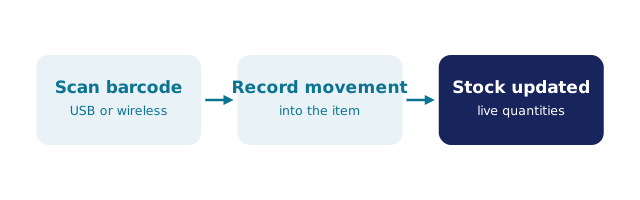
The phone's camera reads the code; the browser app opens the document that code belongs to; the scan writes a movement. That last clause is the whole value: a mobile scan into a live record updates quantities in the moment — the receipt counts stock in against its purchase order, the pick allocates against its order, the count surfaces variances on the spot. A mobile scan into a silo — a free app keeping its own list — produces a nice-looking diary and a reconciliation job.
What mobile scanning replaces is the hardware cart: dedicated terminals, charging docks, device management. For the volumes most small-to-medium operations run, the phone covers receiving bays, aisles and vans at zero marginal cost, with every scan attributed to the person holding the phone. The scanning practice guide covers the four workflows, and the scanning-with-tracking guide shows the trail scans leave.
Where mobile wins, where the desk wins, where BSimple fits
Mobile wins on the floor: anywhere stock actually moves, the phone is already there, and the browser reaches the record from the bay, the aisle or the van. The desk wins at the bench: high-volume entry at a fixed station is faster with a USB keyboard-wedge scanner typing into the same fields — which is why the honest setup mixes both rather than standardising. Terminals remain a scale purchase for all-day, glove-and-rugged environments most SMEs never reach.
We build BSimple, so weigh that: scanning runs through any phone browser — camera scanning included, keyboard-wedge supported — writing to the same live record that orders, purchasing and invoicing read from. No app store, no installs, nothing to charge beyond the phone. Plans start at $180/month (AUD), and the free trial scans your own first carton before anything is paid. The hardware reality check covers what to buy and what to skip.
Frequently Asked Questions
Can a phone replace a barcode scanner?
For floor work — receiving, picking, counting, tracing — yes: the camera reads the same codes at adequate speed, and the browser writes to the same record a terminal would. Bench-heavy volume is where a wedge scanner earns its place; terminals wait for scale.
Does mobile scanning need an app?
Not in BSimple: scanning runs through the mobile browser, so there is nothing to install, approve or update. The camera, the browser and the record are the whole stack — which also means every phone model works the moment it has a browser.
What if the phone has no signal in part of the warehouse?
Fix the coverage — a repeater or mesh node costs less than any terminal fleet. BSimple needs a connection to record movements; offline, nothing corrupts, but nothing updates either. The offline assessment covers when that is disqualifying.
How accurate is phone camera scanning?
On modern phones, effectively as accurate as a laser for standard 1D and QR codes in normal light — the failure modes are glare and damaged labels, not the reader. Where volume and speed matter, the wedge wins; where truth matters, both beat typing.
BSimple