
Guide / BSimple
Stocktake Software Australia | BSimple
Stocktake software that keeps your numbers honest
Stocktake management is the discipline of keeping your system's numbers honest. Over time, stock levels drift from the truth — items get misplaced in the warehouse, counted twice on a label, or damaged and quietly discarded. A stocktake is the correction: you physically count what's actually there and reconcile it against what the software thinks you have. Done well, it keeps your accounts accurate and your reordering decisions trustworthy.
The two big rhythms are the EOFY stocktake and cycle counts. An end-of-financial-year count is the annual full recount that satisfies your accountant and confirms your balance sheet valuation. Cycle counts are the smarter daily habit — counting a rotating selection of lines or a zone of the warehouse on an ongoing basis, so you catch drift early instead of discovering it all at the end of the year. In a business where the stock ledger feeds straight into Xero, getting this right is not cosmetic; it is the difference between a quiet audit and a painful one.
Modern stocktake tools make the painful part disappear. Mobile barcode scanning is a huge step up from pen and paper — staff point a scanner or phone camera at a label, the system counts it, and nobody keys numbers into a spreadsheet by hand. Because the count runs in the browser, any staff phone doubles as the stocktake app: nothing to install, nothing to sync back at the end of the count. The other half of the job is variance reconciliation: being able to see the difference between counted and expected stock line by line, decide what caused it, and adjust so your numbers carry real meaning again.
The stocktake entry workflow
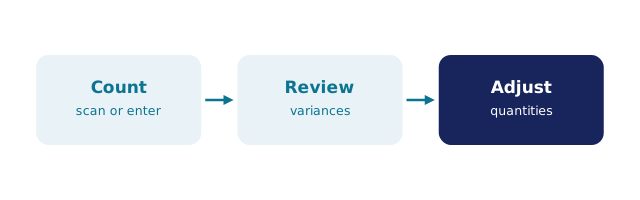
Every stocktake entry follows the same four moves, whether it is a ten-line van count or the full EOFY count. Open the count so the system records what it believes at the moment you start. Enter what you actually find — scanned or keyed, line by line, as you walk the floor. Review the variances while the trail is fresh, each disagreement shown against its recent movement history. Adjust only what has been explained, so the record keeps its story. Capturing entries live is what makes the review worth having: the count reflects the shelf, not someone's memory of the shelf a week earlier.

BSimple treats stocktake as a core activity rather than an afterthought. You can count live in the system as you walk the floor, what your counter finds updates the inventory in the moment, and the variance report shows you exactly where your books drifted. It pairs naturally with barcode scanning for inventory, the walk-and-scan method is covered step by step in stocktake with a barcode scanner, it gives you clean input for your inventory reporting, and it sits inside the same inventory management software you use for everything else — no exporting and re-importing between tools just to hold an annual count.
BSimple