
Inventory control / barcode workflow

Barcode Inventory Management Software for Australian Small Business

Use the phone in your team's pocket to scan, track and control stock without turning every movement into another manual data-entry task.

Start your free trial

The stock movement

01ScanRead the product or batch
02RecordAttach it to the right workflow
03Stock changeUpdate the quantity on hand

Barcode in, order out — the customer portal POS screen.

No separate scanning app or enterprise handheld terminal is required for the browser-based workflow described here.

01 / start with the process

Barcodes solve a process problem, not a people problem.

Everything your team needs to scan, track, and control stock — using the phone in their pocket.

  • Works with any keyboard-wedge barcode scanner — USB or Bluetooth — including the NETUM, Inateck and ScanAvenger models popular with Australian small business; your laptop or iPad plus a scanner is the whole setup
  • Camera scanning through AI: connect BSimple's MCP endpoint to ChatGPT and your team's phone photos become scans — read a code, run a count, verify a pick, with the assistant acting on the live BSimple record
  • Scan to receive stock against purchase orders and update inventory in real-time
  • Scanner-mode picking from the customer order screen flags the wrong item before it ships
  • Scanning-based stocktakes that replace clipboard and count sheet workflows
  • Batch numbers with use-by dates generated by recipes for manufactured and repackaged products

Managing 100+ SKUs manually is exactly where stock errors start creeping in. A supplier delivery gets partially miscounted. A picker grabs the wrong variant. A stocktake takes two days and the numbers still don't reconcile. None of this is a people problem — it's a process problem, and barcodes solve it.

The assumption most small businesses make is that barcode scanning requires expensive handheld hardware or enterprise warehouse software. That's not the case with BSimple. Your team can scan with the hardware you already own: any USB or Bluetooth scanner that types like a keyboard works the moment it's paired, and there's nothing to install or configure on the BSimple side. Prefer camera scanning? Connect ChatGPT to BSimple's MCP endpoint and your phone's photos do the reading — the assistant decodes the code and writes to the same live record. Either way, the scanner is commodity; the software deciding what a scan means is the product.

BSimple runs scanning on the same record as everything else — orders, purchasing, invoicing — and hands approved invoices to Xero so the ledger stays clean without re-entry. If you want the scanner side in detail, how a barcode scanner plugs into inventory software covers the mechanism and the hardware that works.

See the broader inventory workflow

02 / inbound and outbound

One scan should change the next warehouse decision.

IN / RECEIVE

Match the delivery to the purchase order.

When a supplier delivery pulls up, the old process is to count boxes, scribble quantities on a delivery docket, and then enter those numbers into your system later - hoping nothing gets transposed or forgotten in between. With barcode scanning in BSimple, your team opens the relevant purchase order on their phone and scans each item as it comes off the truck. The system confirms quantities against what was ordered and updates inventory on the spot. No manual counting. No re-entry. No reconciliation at the end of the week.

On the dispatch side, BSimple generates pick lists from customer orders. Your team moves through the warehouse scanning each item as they pick it - the system confirms the right product and the right quantity for that specific order. If the wrong item gets scanned, BSimple flags it before anything gets packed. That's a pick error caught before it becomes a customer complaint, a return, and the cost of re-shipping.

Once orders are fulfilled, BSimple pushes confirmed invoices through to Xero automatically - so your accounts are updated without anyone typing a thing. If you want to understand how the full order process connects, take a look at our order management system overview.
OUT / DISPATCH

Catch the wrong item before it becomes a return.

Pick from the customer order, confirm the product and quantity, and flag a mismatch before the parcel leaves. Confirmed fulfilment can then flow into the invoice and accounting record.

See the order-management handoff

03 / count without the clipboard

Make the variance visible while someone can still investigate it.

Ask anyone who's run a traditional stocktake what it involves and they'll tell you: print count sheets, clear the warehouse, count everything by hand, enter the numbers, investigate the variances, count again. For a business with a few hundred SKUs, that's a full day - sometimes two. And there's still a decent chance the final numbers have a few data-entry errors baked in.

With BSimple's barcode scanning, stocktakes work differently. Your team moves through the warehouse with their phone, scanning items as they go. BSimple records the count and compares it to what the system expects to be on the shelf - flagging variances immediately, so you're investigating them in real-time rather than three days later when no one can remember what was where.

You can also run cycle counts - scanning one section of the warehouse at a time on a rolling basis - rather than shutting everything down for a full count once a year. It's a much more practical approach for businesses that can't afford downtime. If you want to see the broader inventory picture, our inventory management software page covers how BSimple handles stock tracking across the full cycle.

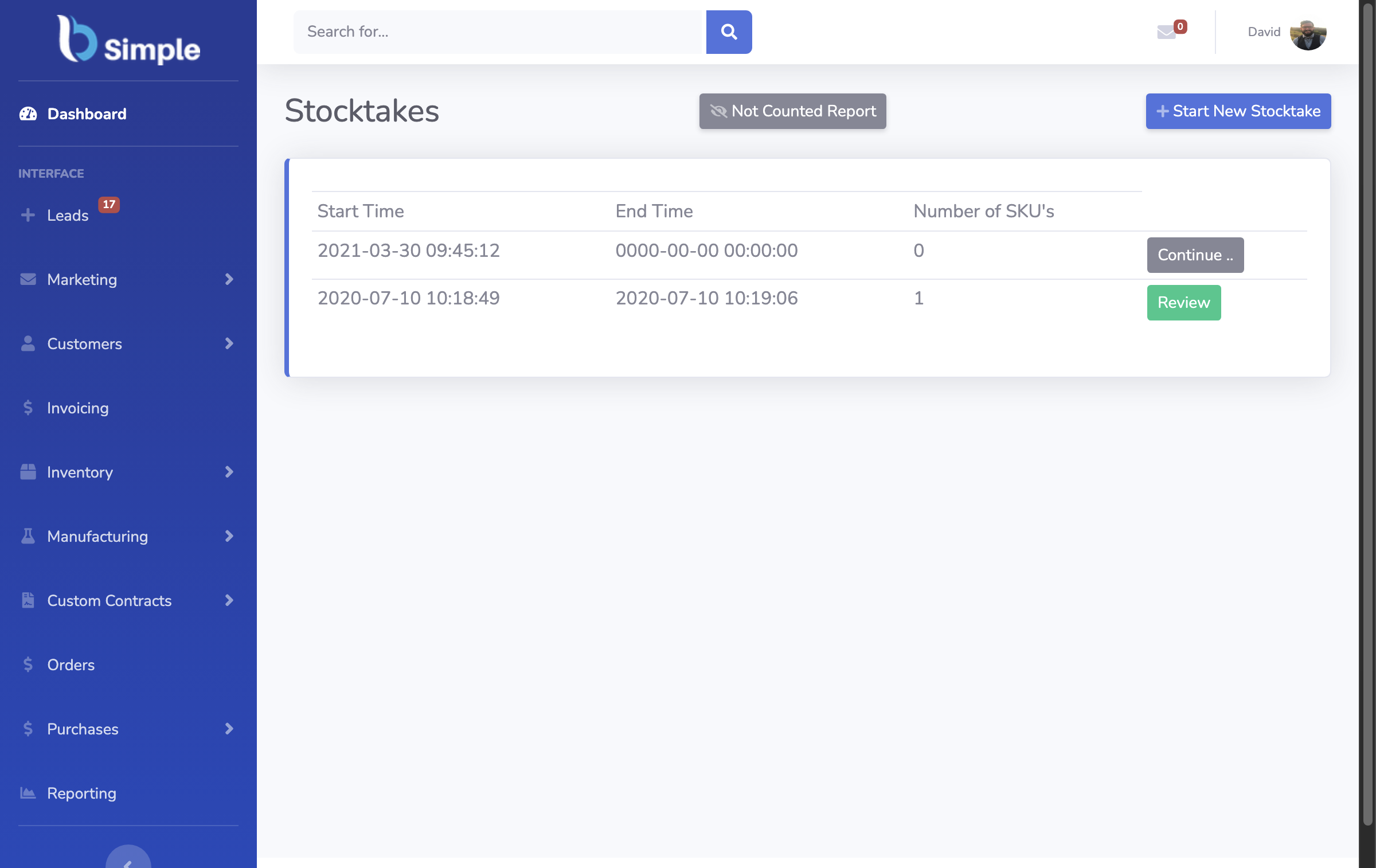
BSimple Stocktakes screen showing start and review controls and SKU counts
Real BSimple Stocktakes screen. It proves the stocktake index and review state, not a barcode scan itself.

04 / batch traceability

Follow a product from supplier lot to customer invoice.

01Supplier lotWhat arrived and where it came from
02Production batchWhat was made or repackaged
03Customer invoiceWho received the affected stock

For businesses that manufacture products, repackage in bulk, or do light assembly, barcodes do more than just identify SKUs - they identify batches. BSimple's manufacturing module generates a unique barcode for every production batch that rolls off your line. That barcode travels with the batch through finished goods storage and is scanned at dispatch when allocating stock to a customer order.

This creates something genuinely useful: full traceability from the raw material supplier lot through the production batch to the specific customer invoice. If there's ever a quality issue - contaminated ingredient, wrong formulation, certification problem - you can trace forward to see exactly which customers received affected stock, and trace backward to see exactly which supplier delivered the ingredient in question. For food producers, coffee roasters, breweries, and chemical blenders, this is how you manage product recalls and demonstrate compliance without paying ERP money to do it.

This is just one part of what BSimple's manufacturing module handles. If you're producing goods at any scale, the manufacturing inventory software page walks through recipe management, production runs, and batch tracking in full detail.

Questions before rollout

Choose the scanning setup that fits the operation.

Can I use my phone as a barcode scanner with BSimple?

Yes — through AI assistance rather than a native scanner. Connect ChatGPT to BSimple's MCP endpoint, photograph the barcode or count sheet with your phone, and ChatGPT reads it and acts on your BSimple record — a workflow that covers scanning, stocktakes and pick verification without any dedicated hardware. For bench and warehouse speed, a keyboard-wedge scanner (any USB or Bluetooth model) paired to a laptop or tablet types straight into BSimple with zero setup.

Does BSimple work with any USB or Bluetooth barcode scanner?

Yes. BSimple is scanner-agnostic: any USB or Bluetooth scanner that inputs like a keyboard (the keyboard-wedge or HID mode every common scanner has) works, because the scanner types the code into the active field and BSimple does the rest. That includes the models Australian small businesses buy most — NETUM (C750, NT-1228BL, NT-M1), Inateck BCST-70, ScanAvenger — alongside Zebra, Honeywell and Tera. Pair the scanner to your laptop or tablet, put it in keyboard/HID mode, set it to send a carriage return after each scan, click into the field and scan. There is nothing to configure on the BSimple side. More detail in the barcode scanner guide.

Does BSimple print barcode labels?

No — label printing is deliberately outside BSimple. BSimple stores a barcode value against every product, so any label tool can print to your own printer using that value; supplier products already carry GS1 barcodes and scan directly. For manufactured goods, recipes generate batch numbers with use-by dates, so each production lot is identifiable in the system whether or not it carries a printed label.

Does barcode scanning in BSimple sync with Xero?

Yes. BSimple is natively integrated with Xero, so actions triggered by barcode scanning — receiving stock against a purchase order, confirming a picked order for dispatch — flow through to Xero automatically. Supplier bills are created when stock is received, and customer invoices are created when orders are dispatched. There's no manual re-entry between BSimple and Xero.

What barcode formats does BSimple support?

All of them — because BSimple doesn't decode barcodes, your scanner does. The scanner reads whatever it's built to read (the common retail 1D formats, plus 2D and QR on capable models) and types the value into BSimple like a keyboard, so any format your hardware handles works with any product field. On the ChatGPT camera route, ChatGPT does the reading the same way.

Make stock movement legible

Give every scan a useful next action.

Start your free trial