Customer signal
When the order starts
A customer receives a unique ordering link instead of asking the team to re-key a phone, SMS or email order.

Customer access / one incoming signal
Let customers submit the order themselves, then give your team one reliable record to review.
Start your free trialThe incoming signal
Why BSimple started here
One of the first problems it solved was the duplication of data entry, specifically inputting orders.
At every Coffee Roaster or Packaging company I've been to for more than 15 minutes, I've seen one of the staff answer the phone and take down an order from a customer.
Sure, BSimple doesn't instantly solve this - people will still call even once they are setup, because they are the customer and they don't have all the answers on all your products. But, if you consistently point them back to the order portal, continue to refine their list of products, add products when they request them and put the effort into keeping everything up to date and trustworthy.
Enquire nowAccess → submit → review
Customer signal
A customer receives a unique ordering link instead of asking the team to re-key a phone, SMS or email order.
Controlled access
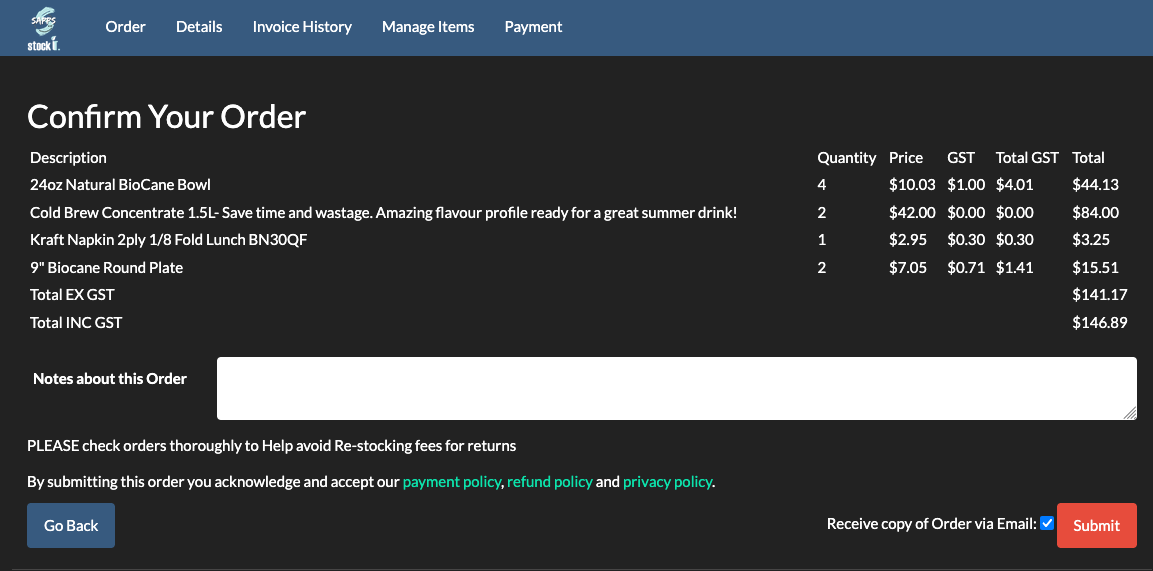
The link loads the right customer profile, pricing, history and payment context without exposing more access than the ordering task needs.
Internal review
The business checks the submitted items and quantities before the order moves into fulfilment and invoicing.
01 / access without support tickets
How many usernames and passwords have you got out there? The average person would have at least 50 accounts out there on the internet. Most of them have the same username and password - talk about security risk.
Do you like getting phone calls from customers asking for help resetting their password because they've forgot it? How about every week?
We hate this. BSimple gives your customers a unique link with a secret code specific to each customer. The BSimple platform interprets this and loads up the correct profile for each different link.
The weakness here is that the link is easily shared and potentially easily lost. To limit the damage misuse could do, BSimple doesn't give the customer really much to do in the ordering portal other than place orders + load up credit card details. They can see past invoice history, and business details, however they cannot edit anything. And yes, you CANNOT see the card details once loaded - they are stored securely on a compliant PCI DSS equipment via EWay.
THE RESTRICTION
Order, payment and historyCustomer access stays narrow by design. Product and business settings remain with the team.02 / optional site login
Well sure, we do actually support usernames and passwords, but we do not host a login page. You'll need to build a login page on your website which collects the username and password and submit it through to our system, which then drops the user into the order page as per normal. There is a forgot password system as well to help users manage their access.
Start your free trial03 / operating guidance
BSimple has an automated system in place which will analyse past invoices (imported via Xero) and build a list of items with the relevant pricing based on this history. To see how order input fits into the bigger picture, explore our order management software guide, the order management software for small business overview, and our list of order management systems.
2ND to this, BSimple strongly recommends for the first few weeks, placing all orders on behalf of the customers. This will give you intimate experience using the system, and the insight to check and fix any problems you see on customers order pages immediately. It is important that you are familiar with the system, because your customers will expect you to be a pro and be able to provide telephone support.
By supplying them with their unique ordering link. You can achieve this in a few ways. Assuming your customer base is Cafes and Resturants, we recommend using the Auto Send SMS facility to automate the invitation out to your customers on a Monday morning at 9am for example. Charges do apply to sending SMS, however it gets the best ordering results. This will automatically adjust each message with the unique ordering link. Just put in a nice friendly invitation like: "Hey, David here from BSimple. Just inviting you to order coffee, orders need to be placed by 3pm today for delivery Thursday. Cheers!" If this isn't your style you can use the Send SMS by Email to achieve a similar thing, except using emails. Finally you can manually copy and paste the ordering link for each customer into whatever communications you have existing (usually mobile phone).
When the founder, David was operating the packaging company he was doing all the order inputs manually. They were transcribed from SMS messages and let me tell you - it was utter chaos. The amount of mistakes in assuming what a customer referred to a Large cup as... As David is inherently lazy, and also lucky enough to have the software dev skills, he quickly built on the initial version of BSimple as an interface on top of Xero and quickly expanded out the inventory and ability for customers to order through it. Even initially as an internal tool, it saved stacks of time as a "Large cup" now was easy to define based on what products where on the ordering page.
BSimple is fantastic for managing your inventory, including loading in purchase orders and generating all sorts of reports. It is also great at:
Less re-entry, better orders