
Guide / barcode scanning
How does a barcode scanner plug into inventory software?
A scan is just fast typing — the software decides what the scan means. Here is the anatomy of a scan event, the four moments scanning pays off, and how to choose well.
The facts about barcode scanning in inventory software
- Every scanner is a keyboard: the scan types a code into a field; the software turns that into meaning — a receipt, a pick, a count.
- The software is the product, not the scanner. Hardware is commodity; what happens after the scan is everything.
- Four moments pay off: receiving, picking, stocktakes and traceability. Everything else is convenience.
- Phone cameras scan too — BSimple scans in the browser on any phone or tablet, plus keyboard-wedge scanners.
- Standard GS1 supplier barcodes scan directly — most products already carry one, so no labelling project.
- BSimple includes scanning in every plan from $180/month (AUD), with a free trial.
- 01The facts about barcode scanning in inventory software
- 02The anatomy of a scan event
- 03The four moments scanning pays for itself
- 04Choosing the software, not the scanner
- 05Where BSimple fits
The anatomy of a scan event
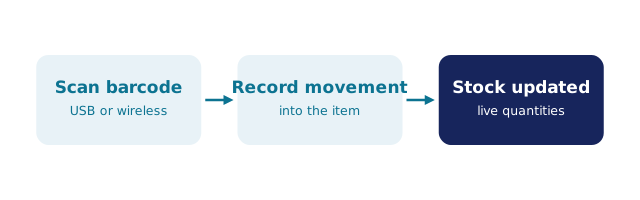
Every scan is the same four steps. Read: camera or laser decodes the barcode — identical everywhere. Input: the code lands in a field exactly as a keyboard would have typed it. Resolve: the software matches the code to a product, order line or batch — where quality lives, because the match must respect quantity, location and expiry context. Act: the record changes — stock received, pick confirmed, count recorded — immediately and visibly.
Two systems can share the first step and differ completely on the last two: a cheap tool types the code into a search box and leaves the thinking to you; a proper system closes the loop — flags the wrong item, rejects the wrong quantity, updates the record — without a second person checking.
The four moments scanning pays for itself
Receiving. Scan items off the truck against the purchase order; the goods receipt updates stock in real time and discrepancies surface at the dock — not at the next stocktake.
Picking. The scan confirms the right product and quantity for that order. Wrong picks are flagged before packing — worth more in a small team than any dashboard.
Stocktakes. The day a clipboard dies. Walk the shelves scanning, or run cycle counts section by section — the count lands live, discrepancies flag themselves, and EOFY stops being a shutdown. BSimple's stocktake workflow covers both full counts and cycle counts.
Traceability. Where batches carry expiry dates, the scan follows the lot from receipt through production to dispatch — the chain a recall or audit demands.
Choosing the software, not the scanner
Hardware advice is easy because hardware is interchangeable: any USB or Bluetooth scanner that acts as a keyboard input — the common keyboard-wedge kind, from brands like Zebra or Honeywell — types into the active field of browser-based systems.
The questions that differentiate vendors are all software: does a scan update the record instantly or queue for review; what happens on a wrong scan — silent accept or visible flag; can two people scan the same record at once; do scanned picks flow through to invoices without re-entry. Ask those four and demo the answers with one real delivery. The comparison of the best scanner-integrated systems applies the same test, and the app-shaped alternative shows where standalone scanning apps stop short.
Where BSimple fits
We build BSimple, so weigh that. Scanning in BSimple is browser-native — phone, tablet or keyboard-wedge scanner — and lands on the same record as everything else: receiving against purchase orders, picking with wrong-item flags, stocktakes and cycle counts, batch tracking with expiry. Orders, a customer portal and invoicing share that record, and the Xero or MYOB handoff closes the loop. The inventory management page shows the whole system.
The boundary, plainly: no conveyor integration, no RFID, no high-volume distribution automation — at that scale a dedicated WMS is the right answer. If you want scans to close the loop on a live record, start the free trial and scan a real delivery in your first session. If you are still weighing scanning against spreadsheet workflows, the Excel scanner guide shows where the sheet approach ends.

Frequently Asked Questions
Do I need special hardware to scan barcodes into inventory software?
No. BSimple scans through the browser on any smartphone or tablet — the camera does the reading. Dedicated keyboard-wedge scanners also work if your team prefers them. The differentiator is the software's behaviour after the scan, not the device.
Will we have to label all our products?
Usually not. Supplier products with standard GS1 barcodes scan directly. Own labels are only needed for unmarked stock — bulk ingredients, batch-labelled runs — and BSimple's batch tracking makes those labels carry traceability, not just identity.
What happens when someone scans the wrong item?
In a properly integrated system the scan is checked against the order context: BSimple flags the mismatch before anything is packed or received, so the error costs seconds, not a return freight. A scanner alone cannot do this — the software's context check catches it.
Does scanning really make stocktakes faster?
Yes — and it changes their shape. Full counts stop being shutdowns because scanning runs in hours, and cycle counts become practical: one section a week, discrepancies caught fresh. The count is no longer the bottleneck; reconciling was.
How much does barcode scanning capability cost?
In BSimple, nothing extra: scanning is included on every plan from $180/month (AUD), with no per-scanner or per-user fees. The trial includes it, so you can scan a real delivery before deciding.
BSimple