
Guide / tracking and traceability
What does barcode scanning do for inventory tracking?
Tracking asks where stock came from, where it went, and who moved it. Scanning turns those answers from a monthly guess into a live trail on one record.
The facts about barcode-driven tracking
- Tracking is not counting. A count says how many; a trail says from where, to where, and on whose watch.
- Scans make the trail continuous: every receipt, pick, transfer and adjustment stamps the record in the moment.
- The trail answers the expensive questions: the shortage, the recall, the customer dispute, the shrinkage pattern.
- Phone cameras scan — BSimple tracks through the browser on any phone plus keyboard-wedge scanners, included from $180/month (AUD).
- The trail only exists on one record — scans that land on a spreadsheet are notes, not tracking.
- Where it fits: this page zooms into one part of the barcode inventory guide.
- 01The facts about barcode-driven tracking
- 02Counting tells you what; tracking tells you why
- 03What the trail gives you, concretely
- 04How to judge tracking claims in a demo
- 05Where BSimple fits
Counting tells you what; tracking tells you why
A stock count answers "how many?" — and then stops. Tracking answers the questions that follow within the week: why is this short, which delivery was it on, where was it seen last, who received it, which customer got the rest? A system without a movement trail can only shrug; one with the trail answers from the record in seconds.
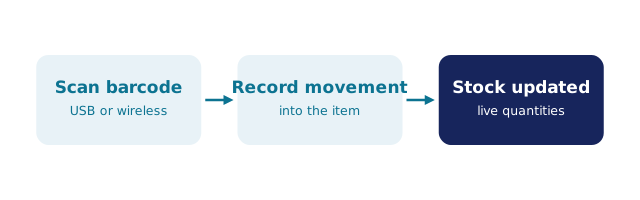
Barcode scanning is what makes the trail affordable. Typing product codes and quantities after the fact produces a trail with holes exactly where the rush was; scanning stamps each movement at the moment it happens, attributed to the user, against the order or document it belonged to. The trail stops being a reconstruction and becomes a property of the record itself.
What the trail gives you, concretely
Shortages with suspects. When the count disagrees with the record, the movement history shows what went where since the last true count — shrinkage stops being a mystery and becomes a pattern.
Recalls and disputes without archaeology. Batch-lot tracking with traceability search follows a bad input lot forward to every affected customer, or a complaint back to its source — the difference between a targeted response and a blanket apology. The batch tracking guide covers this in depth.
Stock that moves between places. Vans, jobs, warehouses, counters: transfers recorded by scan keep every location's numbers honest, including the ones on wheels.
Faster, calmer counts. Cycle counts by scan keep the record continuously reconciled, so the annual stocktake confirms rather than discovers.
How to judge tracking claims in a demo
Scan one item, then ask the vendor to produce its life story: where it was received, which orders touched it, where it sits now, who moved it last. Systems with real tracking answer from the record; systems with decorative tracking open a spreadsheet export. Then scan the same item on a phone — if scanning needs dedicated hardware tethered to a desk, the trail will have gaps exactly where the team is busiest.
Finally, check where the trail lands: a movement history on the same record as orders and invoices ties shortages to customers and receipts to suppliers. A trail on a separate tracking tool links to nothing. The best-scanner-systems comparison and the scanning anatomy guide cover the adjacent questions — hardware and workflow — from the same one-record principle.
Where BSimple fits
We build BSimple, so weigh that. Tracking in BSimple is the record itself: every receipt, pick, transfer and adjustment is stamped against one live record — attributed, order-linked, searchable — with batch and lot traceability and use-by dates where provenance matters, stocktakes and cycle counts on any phone browser, and keyboard-wedge scanner support for teams who prefer hardware. Scanning is included on every plan from $180/month (AUD); the Xero or MYOB handoff keeps the financial shadow of the trail equally honest. The inventory management page shows the record the trail lives on.
The boundary: BSimple does not do real-time RFID or sensor-based tracking — if stock must be tracked without anyone scanning anything, that is a different category of system. Where people scan as they work, the free trial with one shelf of real stock will show you the trail building itself.

Frequently Asked Questions
What is the difference between inventory counting and tracking?
Counting produces a quantity; tracking produces a history. Tracking answers where stock came from, where it went and who moved it — which is what shortages, recalls and disputes actually require. Scanning makes the history continuous rather than reconstructed.
Do we need special scanners for inventory tracking?
No. BSimple scans through the browser on any smartphone or tablet camera, and keyboard-wedge USB or Bluetooth scanners work where preferred. The tracking quality comes from the software record, not the device.
Can tracking show which customer received a batch?
Yes, when batches and orders live on one record: BSimple's traceability search follows a lot through production and dispatch to the customers who received it — the sequence a recall, audit or quality complaint demands.
Will tracking slow the team down?
A scan is faster than typing and more accurate than memory, so in practice the trail speeds work up. The real risk is a system that needs extra steps after the scan — duplicating movements into another record. One record, one scan, no retyping.
What does tracking-capable software cost?
BSimple includes scanning, movement history and traceability on every plan from $180/month (AUD) — no per-scanner fees. Compare that against the cost of one unexplained shortage or one week of recall archaeology, and the trail usually justifies itself.
BSimple