
Guide / scanning
Inventory software and scanners: how the pairing works
A scanner is a keyboard that types barcodes — so the pairing question is really about what the software does with the code. Flows that work, mistakes to avoid, tests to run first.
The key facts
- Standard scanners act as keyboards: they type the code into the focused field — browser software like BSimple needs nothing proprietary.
- The scan is input; the record is the product: a code must resolve to a product and record a movement, or the scanner is decoration.
- Most codes already exist: supplier cartons and GS1 barcodes usually beat printing your own for received goods.
- The pre-purchase test: scan a real product into a real screen and watch the movement land — the trial with your goods.
- 01The key facts
- 02How a scanner actually pairs with software
- 03The mistakes that make scanning useless
- 04BSimple's pairing, and the test to run
How a scanner actually pairs with software
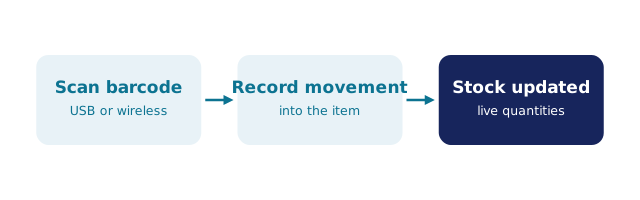
Every mainstream barcode scanner — USB corded, Bluetooth in keyboard mode, even phone-camera apps — works the same way: read the code, type it, press Enter. That is why browser-based systems like BSimple pair with any of them: focus the search or quantity field, pull the trigger, and the system resolves the code to a product and records the movement — a receipt, a pick, a count — against the live record. No driver installs, no hardware certification, no vendor lock on the scanner choice.
The consequence cuts both ways: because the scanner is "just input", the software decides whether scanning is a workflow or a gimmick. The flows that matter: receiving (scan the carton's supplier code, quantities update per lot), picking (scan to confirm the right item went into the box), counts (scan-and-enter per shelf, variances flagged), and search (scan to find a product's whole history). The scanner workflow in detail and the barcode-systems overview cover the mechanics.
The mistakes that make scanning useless
Scanning into a system with no movement model. If the software stores editable quantities, a scan just types faster into a record that stays wrong. The scan and the record must connect: code → product → movement. The QuickBooks-scanning case shows the difference from the accounting side.
Relabelling everything. Goods arrive with codes — supplier cartons, GS1 symbols. Printing your own labels for every receipt adds a step at the door and a reason to skip it. Reserve printing for inner packs, shelf slots and naked items; the scan-and-print page covers that pipeline honestly.
Scanning at a desk what happens at a shelf. The scan point should be where the movement happens. A batch of scans typed in at 4pm from a clipboard is the old system with extra hardware.
BSimple's pairing, and the test to run
We build BSimple, so weigh that: browser-based, so standard HID scanners pair without ceremony, and the codes resolve to movements on the live record — receipts update lots, picks confirm items, counts build variances for review. No proprietary hardware is sold or required; the scanner choice stays yours. Accounting (Xero, MYOB; US integrations rolling out) receives the reviewed results of all that scanning without re-entry.
Before trusting any pairing — ours included — run the loop: one real carton, one real sale, one real count, on the trial. Watch that every scan lands as a movement with a story. The wider barcode question covers the QR variant, and the stocktake flow shows where scanning pays for itself first.
Frequently Asked Questions
What scanner works with BSimple?
Any mainstream scanner that acts as a keyboard — USB HID corded, or Bluetooth in keyboard mode. No proprietary hardware, no pairing ceremony; plug in, focus the field, scan. The scanner budget stays yours.
Do we need to barcode all our products first?
No — start with what arrives coded (supplier cartons, GS1 goods) and scan at receipt. Print your own labels only where nothing exists: inner packs, shelf locations, workshop items. Full coverage is a destination, not a prerequisite.
Can phones replace dedicated scanners?
For occasional lookups and counts, the camera works. For hours of daily picking, a purpose-built scanner is faster, sturdier and cheaper per scan than a phone in a rugged case. Match the tool to the hours.
What should a scan do in the software?
Resolve to a product and record a movement — receipt, pick, count, transfer — on the live record, with history. If a scan only displays information, it is a fast search, not inventory control.
How do we test the pairing before buying?
Bring your scanner and three real items to the trial: receive one, sell one, count one. Every scan should land as a movement you can trace later. An afternoon; the answer is permanent.

BSimple