
Guide / barcodes and accounting
Can you use a barcode scanner with QuickBooks?
Yes — a scanner is just a keyboard that types barcodes, so it fills QuickBooks fields. The honest part is what the scan can and cannot fix once the code is in.
The key facts
- Any USB HID scanner works with QuickBooks — it types the code into whatever field is focused. No special hardware or integration needed.
- The scan is input, not process: what happens to the code — stock lookup, movement, valuation — depends on the software receiving it.
- The ceiling is the inventory module, not the scanner: QuickBooks' inventory covers simple stock; multi-location, batch and warehouse workflows are where dedicated systems start.
- BSimple works with the same standard scanners (browser-based, keyboard-input), with accounting handed to Xero and MYOB — US integrations rolling out, no finished QuickBooks claim.
- Where it fits: this page zooms into one part of barcode inventory management.
- 01The key facts
- 02How scanning works with QuickBooks, mechanically
- 03Where the scanner-plus-module setup stops being enough
- 04BSimple's position, stated plainly
How scanning works with QuickBooks, mechanically
A barcode scanner is a keyboard in disguise: read a code, "type" it, press Enter. Plug a standard USB scanner into the computer running QuickBooks and it will fill the barcode or item-lookup field on the sales screen exactly as if someone had keyed it — faster, and without the transposition errors. QuickBooks Online also has its own barcode support within its inventory feature set, so for simple stock the loop — scan item, see quantity, sell — does close.
What the scan does not change is what the software does with the code. If the receiving screen has nowhere sensible to scan into, or quantities update on invoice events rather than goods movements, the scanner is a fast way to type into a system that still cannot answer the warehouse's questions. Speed of input and truth of record are different purchases.
Where the scanner-plus-module setup stops being enough
The pattern is predictable: it works until the second location, the box-of-ten, or the batch date arrives. A scanner typing into a single-location quantity field cannot tell you what is in the van versus the warehouse; a barcode on a carton of twelve does not become twelve singles; and nothing in an accounting-first screen records why a quantity changed — a sale, a breakage, a miscount — so variances have no history to interrogate. Where QuickBooks' own inventory ceiling sits is the longer version of this paragraph.
That is the point where a dedicated inventory system earns its place: the scanner keeps doing what it does — typing codes fast — but the record behind it updates from real movements, per location, with an audit trail. The barcode workflow shows what that looks like day to day.
BSimple's position, stated plainly
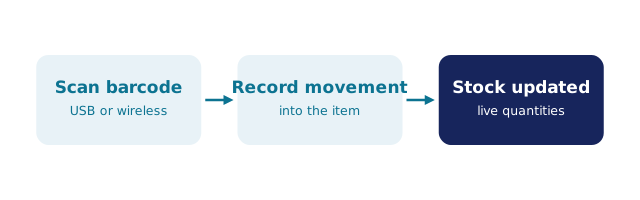
We build BSimple, so weigh that. It is browser-based, so the same standard scanners work — plug in, focus the field, scan, and the movement lands on the live record. Its accounting boundary is deliberate: invoices push to Xero and MYOB after approval and payment status mirrors back, with US accounting integrations rolling out — we do not claim finished QuickBooks support, and the current status is one honest question away. If QuickBooks must remain your system of record and its module covers your stock, scanning into QuickBooks is a legitimate answer; if the stock has outgrown the module, the QuickBooks-first buying decision and the trial are the honest next steps.
Frequently Asked Questions
What scanner should I buy for QuickBooks?
A mainstream 1D/2D USB scanner that acts as a keyboard — no proprietary hardware is needed. If you also scan phone-camera QR codes or work off a tablet, check the scanner's connection type matches where the work happens.
Does scanning fix my inventory counts?
No — scanning fixes input speed and keying errors. Counts stay wrong if quantities are adjusted by memory or if movements happen outside the record; the fix for that is process and a system of record, not a faster keyboard.
Can I scan into QuickBooks and a separate inventory system?
You can, but decide which system owns quantities — scanning the same goods into two masters creates the drift problem the scan was meant to solve. The operational system should own movements; the books receive reviewed values.
Does BSimple integrate with QuickBooks?
Not yet as a finished integration — the established handoff is Xero and MYOB, with US accounting integrations rolling out. We state that plainly rather than claim support that does not exist.
What should I test before buying either path?
One real carton, one real sale, one real count: scan the carton in, scan a sale out, scan a count, and check every quantity change has a story behind it. Run that in QuickBooks' module and in the BSimple trial — the difference will be obvious in an afternoon.

BSimple