How To Use Barcode Scanner For Inventory: Your Practical Guide

Practical guide to How To Use Barcode Scanner For Inventory for Australian businesses. Streamline operations with Xero integration, automated ordering, and r...

Prefer to talk? Call 1300 980 598
  • Real-time inventory updates eliminating manual counting errors and spreadsheet delays
  • Seamless Xero integration automatically syncing stock data with financial records
  • Automated purchase order generation triggering reorders at optimal inventory levels
  • Batch and serial number tracking for expiration dates and product recalls
  • Mobile scanning capability using smartphones and tablets across warehouse locations
  • Negative inventory tracking preventing overselling and customer disappointment
  • Just-in-time inventory practices reducing cash tied up in excess stock

Barcode scanning has become essential for Australian wholesale, manufacturing, and distribution businesses looking to streamline their inventory management. Whether you're running a Sydney coffee roastery tracking bean shipments or a Melbourne brewery managing stock levels across multiple locations, understanding how to effectively use barcode scanners can transform your operations from chaotic to controlled.

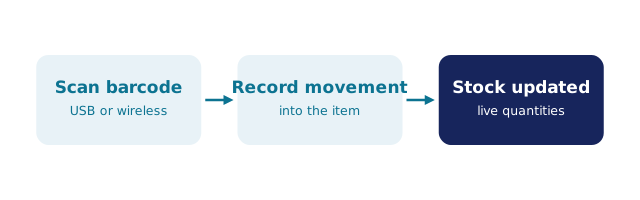
At its core, barcode scanning is straightforward: you use a dedicated scanner or mobile device to read the unique code printed on products, which instantly logs that item into your system. The real magic happens when this data integrates seamlessly with your inventory management software. Instead of manually counting stock or relying on spreadsheets that get outdated faster than you can say "EOFY stocktake," barcode scanning provides real-time visibility into what you actually have on hand.

The process begins with ensuring every product in your inventory has a unique barcode—typically a UPC, EAN, or SKU code. When you scan a barcode, the scanner reads the encoded information and transmits it to your inventory management system. This could be a dedicated handheld device, a smartphone with barcode scanning software, or a tablet running your inventory application. The system then updates your stock levels instantly, removing the guesswork and manual data entry errors that plague traditional inventory methods.

For Australian SMBs particularly, the beauty of modern barcode systems is their flexibility. You don't need expensive enterprise-grade equipment anymore. Many businesses successfully use smartphone-based scanners paired with cloud-based inventory software like BSimple's inventory management solution, which integrates directly with Xero for seamless financial tracking. This approach keeps costs manageable whilst maintaining accuracy and control over your stock.

The real value emerges when barcode scanning becomes part of your broader inventory strategy. It enables you to implement just-in-time inventory practices, track negative inventory situations before they become problems, and conduct efficient stocktakes without the traditional chaos of counting everything manually. For distribution businesses managing hundreds or thousands of SKUs across warehouses, barcode scanning becomes the backbone of operational efficiency.

BSimple inventory management dashboard

Getting Started With Barcode Scanning For Inventory

Setting up barcode scanning for your business requires more than just purchasing a scanner—it demands a thoughtful approach to your entire inventory ecosystem. The first step is selecting the right hardware and software combination that works for your specific business model. If you're a small manufacturing operation in Brisbane, you might start with a basic 2D barcode scanner and smartphone app. If you're a larger distributor with multiple warehouses, you'd want industrial-grade scanners with robust connectivity and battery life.

Hardware selection matters significantly. There are several scanner types to consider: laser scanners (affordable and reliable for standard barcodes), 2D imagers (can read QR codes and damaged barcodes), and mobile device scanners (using your existing smartphones or tablets). For Australian businesses, the mobile approach has gained popularity because it reduces capital expenditure and allows staff to scan items from anywhere in the warehouse, not just at fixed checkout points.

Once you've selected your hardware, the next critical step is implementing a barcode numbering system. Every product needs a unique identifier. You can use manufacturer barcodes (UPCs or EANs) for products you purchase, or create your own internal SKU barcodes for items you manufacture or repackage. This is particularly important for Australian manufacturers who need to track components through production stages and finished goods through distribution.

Integration with your accounting software is where things get really powerful. BSimple's Xero integration means that when you scan items into inventory, the data flows directly into your financial records, eliminating duplicate data entry and ensuring your balance sheet reflects actual stock levels. This becomes invaluable during EOFY stocktakes when auditors need to reconcile physical inventory with accounting records.

Staff training is often overlooked but absolutely critical. Your team needs to understand not just how to use the scanner, but why accuracy matters. A Melbourne brewery we've worked with discovered that inconsistent scanning practices were causing their inventory records to drift from reality. Once they implemented proper training protocols and standardised scanning procedures, their inventory accuracy improved from 87% to 98% within two months. That's the difference between confident decision-making and costly surprises.

Talk to us

BSimple inventory control software

Real-World Barcode Scanning Scenarios You'll Encounter

The practical day-to-day use of barcode scanners involves several key scenarios that every inventory manager should master. The most common is receiving new stock: when goods arrive from suppliers, you scan each item (or case/pallet if you're using case-level barcodes) to record what's entered your warehouse. This immediately updates your stock levels and can trigger automated actions, such as notifying you when you've reached reorder points or updating customer ordering portals if you use BSimple's customer ordering portal.

Picking and packing operations are where barcode scanning prevents costly errors. Instead of relying on paper pick lists that can be misread or misplaced, your team scans the product barcode and compares it to what the system says they should be picking. If there's a mismatch, the system alerts them immediately. For a Sydney coffee roaster fulfilling wholesale orders to cafes across the city, this means customers receive exactly what they ordered, not close approximations that damage relationships.

Stock movement between locations is another critical use case. If you're a distributor with warehouses in different Australian states, scanning items as they move between locations keeps your system accurate. Without this, you might think stock is in Sydney when it's actually in Brisbane, leading to missed sales and frustrated customers waiting for products you actually have.

Stocktake management is transformed by barcode scanning. Rather than the traditional approach of closing the warehouse, printing thousands of pages, and having staff count everything manually (a nightmare scenario for any Australian business), you can conduct rolling stocktakes. Your team walks through the warehouse with a scanner, scanning items as they go. The system compares scanned quantities to recorded quantities, immediately flagging discrepancies. You can investigate problems in real-time rather than discovering them weeks later when it's too late to trace what went wrong.

Negative inventory tracking is another powerful feature that barcode scanning enables. Sometimes stock goes out the door before it's been formally recorded—perhaps a team member grabbed items for an urgent customer request. With BSimple's negative inventory tracking, your system flags these situations immediately, preventing you from selling stock you don't actually have and avoiding the embarrassment of telling customers their orders can't be fulfilled.

Learn more

BSimple order management interface

Advanced Barcode Scanning Strategies For Competitive Advantage

Beyond basic inventory tracking, advanced barcode scanning practices can deliver competitive advantages for Australian manufacturers and distributors. Batch and serial number tracking is essential for businesses dealing with expiration dates, manufacturing dates, or product recalls. When you scan a barcode linked to batch information, your system knows exactly when that product was made and can alert you before it expires. For a Melbourne brewery managing ingredient inventory, this prevents waste and ensures quality. For pharmaceutical or food distributors, it's often a regulatory requirement.

Quality control integration represents another sophisticated application. Some manufacturers use barcode scanning at multiple production stages to verify that items meet specifications before moving to the next step. A manufacturing facility in Sydney might scan components as they arrive, again when they're used in assembly, and once more when finished products are quality-checked. This creates an audit trail that's invaluable if quality issues emerge later.

Automated purchase order generation is where barcode scanning really shines operationally. When your system tracks inventory via scanning and reaches predetermined reorder points, it can automatically generate purchase orders to your suppliers. For Australian SMBs, this means you're never caught short of critical stock, and you're not over-ordering and tying up cash in excess inventory. BSimple's automated PO generation takes this further by learning your typical lead times and consumption patterns, creating orders at exactly the right moment.

Integration with customer ordering portals creates a seamless experience. When customers can see real-time stock levels through your portal (powered by accurate barcode scanning), they make better decisions and place orders with confidence. They're not calling to check if something's in stock—they can see it themselves. This reduces your administrative burden and improves customer satisfaction simultaneously.

Mobile warehouse management systems have evolved significantly. Modern systems allow your team to use smartphones or tablets running sophisticated warehouse management applications. They can scan items, receive instructions about where to place stock, and confirm completion—all through the same device. For larger Australian distribution operations managing complex warehouse layouts, this technology dramatically improves efficiency and accuracy. The key is choosing a system that works offline (because warehouse wifi isn't always reliable) and syncs when connectivity returns.

Register for a free trial

BSimple purchase order workflow

Frequently Asked Questions

What type of barcode scanner should my Australian business use?

Choose based on your needs: laser scanners for simple barcodes on a budget, 2D imagers for QR codes and damaged barcodes, or mobile devices for flexibility. Most Australian SMBs start with mobile scanning using smartphones and dedicated apps integrated with cloud inventory software.

Can barcode scanning work with my existing Xero accounting software?

Yes, absolutely. BSimple integrates directly with Xero, so barcode scans update both your inventory records and financial accounts simultaneously. This eliminates duplicate data entry and ensures your balance sheet reflects actual stock levels for accurate EOFY reporting.

How do I set up barcodes for products I manufacture rather than purchase?

Create internal SKU barcodes for manufactured items using your inventory management system. Print these barcodes on labels and apply them to products. This allows you to track components through production and finished goods through distribution with the same scanning system.

What's the difference between receiving and picking when using barcode scanners?

Receiving is scanning items as they enter your warehouse to record incoming stock. Picking is scanning items as they leave to fulfil customer orders. Both prevent errors—receiving ensures you got what you paid for, picking ensures customers receive what they ordered.

How can barcode scanning help during my EOFY stocktake?

Instead of closing your warehouse and manually counting everything, conduct rolling stocktakes by scanning items and comparing to system records. Discrepancies appear immediately, allowing you to investigate problems in real-time rather than discovering them weeks later.

Can barcode scanning track products with expiration dates?

Yes, by linking barcodes to batch and serial number information. Your system tracks manufacturing and expiration dates, alerting you before products expire. This is essential for food, beverage, and pharmaceutical distributors managing perishable inventory.

What happens if my warehouse wifi fails during scanning?

Modern mobile scanning systems work offline, storing scan data locally until connectivity returns. Once reconnected, the system syncs automatically. This ensures your team can continue scanning without interruption, even if your internet has a temporary hiccup.