
Guide / barcode and labels
Barcode scanners and printers with inventory software
Scanning is an input; printing is a supply-chain decision. What scanning in BSimple actually supports, what label printing realistically involves, and how to test both before buying.
The key facts
- The scanner is a keyboard: standard USB HID scanners type the code into the focused field — any browser-based system, including BSimple, works with them.
- The barcodes already exist on most goods — supplier barcodes and GS1 codes usually beat printing your own for received stock.
- Label printing is a separate pipeline: BSimple's job is that a scanned code resolves to the right product record; the printing itself depends on your label tooling.
- The test that matters: scan a real product into a real screen and watch the movement record — in the trial, with your goods.
- 01The key facts
- 02How scanning actually works with inventory software
- 03The printer half, honestly
- 04Testing scan-and-print before you buy
How scanning actually works with inventory software
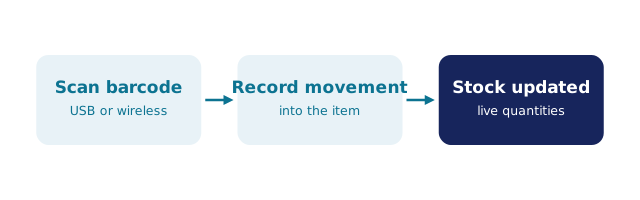
A barcode scanner is an input device that "types" the code it reads and presses Enter. That is why browser software like BSimple works with standard USB scanners out of the box: the scanner fills the search or quantity field, the system resolves the code to a product, and the movement — a receipt, a pick, a count — is recorded against the real record. No special hardware partnership is involved, and any mainstream 1D or 2D scanner that behaves as a keyboard will do. The scanner workflow and the wider barcode angle cover the day-to-day mechanics.
The often-missed half of scanning: most of the codes you need are already on the goods. Supplier cartons carry barcodes, retail goods carry GS1 codes, and receiving with the supplier's own barcode is faster than relabelling everything at the door. Printing your own labels earns its place for inner packs, shelf slots and work-in-progress — not usually for stock that arrived with a code.
The printer half, honestly
Label printing is two pipelines: software that produces the label (code, name, quantity, date), and a printer that renders it — thermal transfer for durable labels, direct thermal for shelf-life short goods, plain laser sheets if volumes are trivial. The question to ask any inventory system is what it emits: a label template straight to a printer, a PDF you print anywhere, or nothing — in which case your label software pulls the product data out (via export or API) and prints independently.
BSimple's honest position: the system is the record the codes resolve to — scanning a code finds the product, and a QR on a pack can resolve straight to the item record — so the barcodes you print must match the codes the record knows. The printing pipeline itself varies by printer and label tooling, and it is a fair question to bring to a trial: scan, print, rescan, and confirm the loop closes on your goods before deciding anything.
Testing scan-and-print before you buy
Bring three physical artefacts to any evaluation: a carton with a supplier barcode, an item you would label yourself, and the printer you actually own. Run the loop — receive against the supplier code, print a label for the inner pack, scan the printed label back into a count — and watch where the friction is. Hardware lists on vendor sites will not reveal it; the loop will.
BSimple's trial exists for exactly this: load your products, plug in a standard scanner, and see the movements recorded live. If the loop closes, the operations dashboard and stock record will hold; if it does not, better to learn that in an afternoon than after an implementation.
Frequently Asked Questions
Do I need a special scanner for BSimple?
No — standard USB HID scanners (the kind that type into a field) work in the browser, as do many Bluetooth models in keyboard mode. No proprietary hardware is required, and no scanner partnership is claimed.
Does BSimple print barcode labels?
The record is BSimple's job: which codes exist, what they resolve to, and the movements they trigger. Label output depends on your printer and label tooling — test your loop in the trial and bring the printing question to us directly, because the honest answer depends on your setup.
Can we use supplier barcodes instead of printing our own?
Usually yes, and it is the faster path: receiving against the barcode already on the carton avoids relabelling at the door. Print your own for inner packs, shelf locations and items that arrive naked — the two approaches coexist.
Will QR codes work as well as barcodes?
Better in some cases — QR codes hold more data and scan well from a phone camera as well as a scanner. The system treats them the same way: a code that resolves to a product record and records a real movement.
What scanner should a small warehouse buy?
One that acts as a keyboard, from a mainstream brand, with a warranty suited to being dropped. Expensive specialised hardware earns its keep in high-volume distribution, not on day one — and since BSimple needs nothing proprietary, the scanner choice stays yours.

BSimple