
Guide / barcode inventory
What makes inventory software genuinely good with a barcode scanner?
Not the scanning — plenty of tools can read a code. The difference is whether the scan lands on one live stock record that drives receiving, picking, stocktakes and invoices.
The facts about barcode inventory software
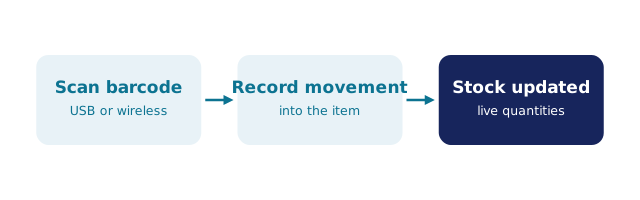
- A scanner is a keyboard. USB and Bluetooth scanners type the code into whatever field is active — the software decides what happens next.
- Scans should hit a live record, updating quantities the moment receiving, picking and counting happen.
- The camera counts. Good modern systems scan through any smartphone or tablet browser — no proprietary terminals to buy or charge.
- GS1 supplier barcodes should just work — most products already carry a scannable code from the supplier.
- BSimple scans through the browser on any phone or tablet, plus keyboard-wedge scanners, directly against stock, orders and purchase orders. Plans start at $180/month (AUD) with a free trial; scanning is core, not an add-on.
- 01The facts about barcode inventory software
- 02What the best barcode systems actually do with each scan
- 03Hardware: what you need and what you skip
- 04How to compare the tools on your shortlist
- 05Where BSimple fits
What the best barcode systems actually do with each scan
Judge any tool on this list — it is the difference between a demo and a working system:
- Receiving. Open the purchase order on a phone, scan items off the truck, and the goods receipt updates stock in real time. Wrong or missing items show up at the dock, not at month end.
- Picking. The picker scans each item; the system confirms it is the right product and quantity for that order, and flags the wrong pick before anything is packed.
- Stocktakes. Walk the warehouse scanning as you go, or run cycle counts section by section — no shutdown, no clipboards, no guesswork.
- Batches and traceability. Where expiry matters, the scan should follow the batch from receipt through production to dispatch and out to the customer.
- Invoicing. The picked order becomes the invoice without re-entry, so what was scanned is what is billed.
Software that scans but leaves any of these five on a separate spreadsheet has moved the typing, not removed it.
Hardware: what you need and what you skip
Barcode scanning no longer requires enterprise hardware: BSimple's scanning works in the browser on any smartphone or tablet — the camera is the scanner, so nothing new is bought, charged or installed. Teams preferring dedicated hardware can use any USB or Bluetooth keyboard-wedge scanner, including Zebra and Honeywell brands, by placing the cursor in the relevant field and scanning.
Supplier barcodes matter more than hardware budgets: standard GS1 codes from suppliers scan directly with no labelling project. Our guide to barcode inventory management covers the whole workflow in detail.
How to compare the tools on your shortlist
Scan one real order through each candidate — a receipt of actual stock, then a pick of an actual customer order. It is the fastest honest test, and trials exist for exactly this. Check three things: does the scan change the stock record instantly; does a wrong scan get flagged in the moment; does the finished order reach Xero or MYOB without retyping.
If you are weighing free options first, the free barcode inventory guide and the free barcode-scanner tier examined set fair expectations — scanning itself is common, but scanning against a live multi-user record is the part free tiers usually cap.
Where BSimple fits
We build BSimple, so weigh that. Scanning in BSimple serves the whole record — receiving against purchase orders, picking with wrong-item flags, stocktakes and cycle counts, batch tracking with expiry — on the same system that runs orders, invoicing, a customer portal and the Xero or MYOB handoff. The inventory barcode scanner guide walks the scanning workflows screen by screen.
Be honest about the boundary: BSimple is not a high-volume distribution WMS with directed slotting and wave picking — a dedicated WMS serves that operation better. If you need scans to land on one true stock record that your invoices and customers also live on, start the free trial and scan a real delivery in the first afternoon. For scanning outside the system — phone apps that log to a sheet — the barcode app guide explains where those break down.

Frequently Asked Questions
Do I need to buy barcode scanners to use barcode inventory software?
Usually not. BSimple scans through the browser on any smartphone or tablet — the camera does the reading — and any USB or Bluetooth keyboard-wedge scanner also types into the active field. The software, not hardware, makes a scan useful.
Will our suppliers' existing barcodes work?
Yes — standard GS1 barcodes from suppliers scan directly, which covers most products. Own labels are only for unmarked stock, where BSimple's batch tracking keeps traceability from receipt to dispatch.
Is barcode scanning worth it for a small stockroom?
It earns its keep the first time a wrong item ships or a stocktake drags on for days. Small teams often benefit most: with no second person to double-check picks, the scan is the check. Cycle counts on a phone are the lowest-effort entry point.
Does BSimple charge extra for barcode scanning?
No. Scanning is core on every plan, from Starter at $180/month (AUD) up — no per-scanner fee, no separate module. The trial includes it, so you can test receiving and picking before paying anything.
Can I keep using spreadsheets and just add a scanner?
You can — a scanner types into Excel like a keyboard, and our Excel and barcode guide explains the setup. The limit arrives with two people, live quantities and order documents: a scan is only as good as the record it lands on.
BSimple