
Guide / examples
Inventory software examples for small business
The useful examples are not product names — they are the four records every system keeps: stock on hand, what to reorder, the count, and the order on its way to an invoice. Here is what each looks like in practice.
The key facts
- Example 1 — the stock record: one product, live quantity, price, and location — replacing the spreadsheet line.
- Example 2 — the reorder view: what falls below par, grouped for the supplier, becoming a purchase order.
- Example 3 — the count: a stocktake against live quantities, with variances adjusted deliberately.
- Example 4 — the order: a customer order through pick and pack to an invoice that pushes to accounting.
- The pattern: every example is the same record viewed from a different job.
Example 1: a stock record that does not lie
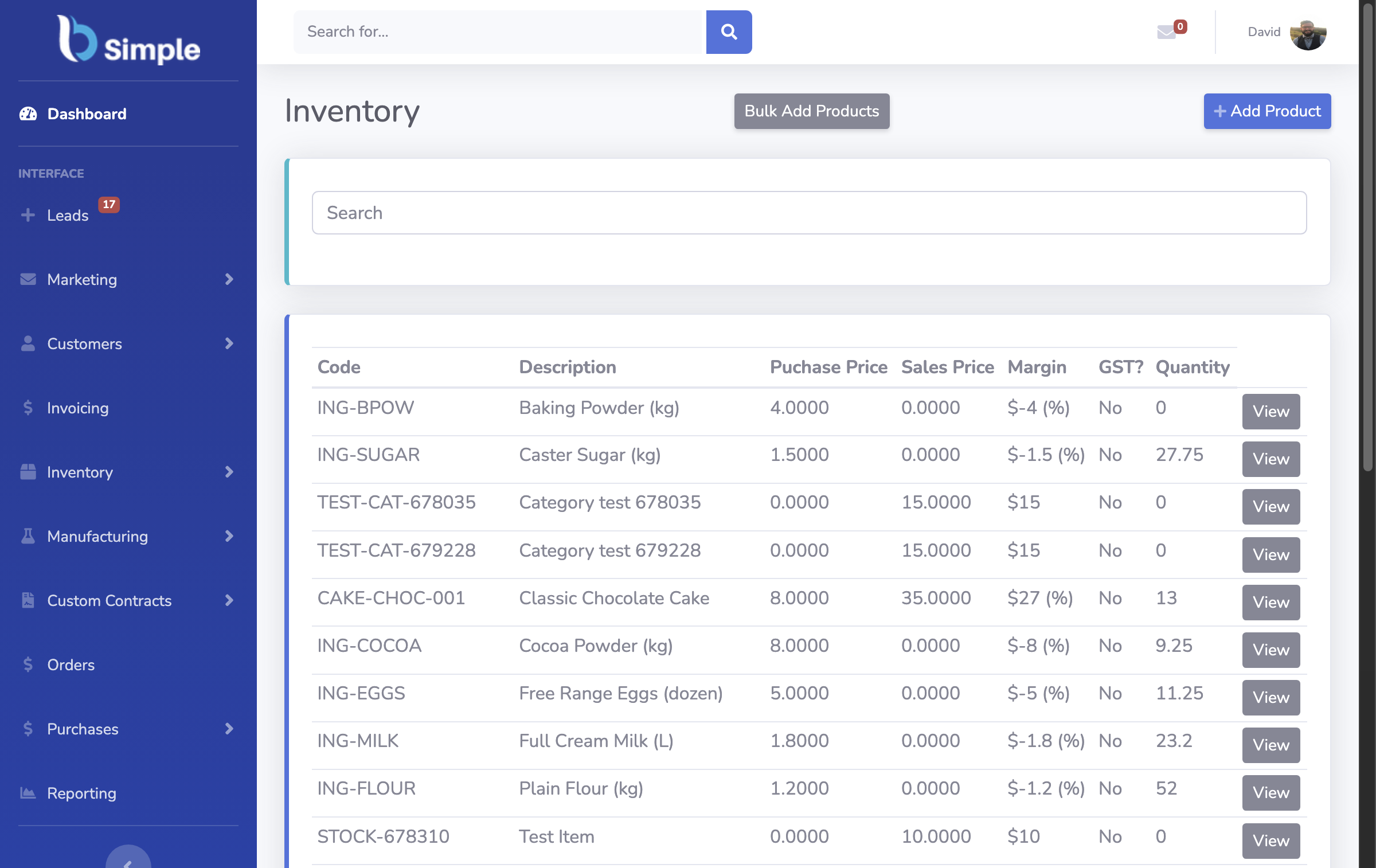
The first example is the least glamorous: one product on screen with its quantity on hand, cost, sell price and location. In a spreadsheet this line is whatever it was last edited to; in inventory management software it is the sum of everything that has happened to the product — goods received, orders shipped, adjustments counted. When a wholesaler looks up a line and sees 42 units, that number already knows about the order packed this morning.
This is the example to judge software on, because everything else stands on it. A system that cannot keep this one line honest cannot do anything else honestly either.
- 01The key facts
- 02Example 1: a stock record that does not lie
- 03Example 2: the reorder view that becomes a purchase order
- 04Example 3: the stocktake, and example 4: the order
- 05How to run the examples on your own products
Example 2: the reorder view that becomes a purchase order
The second example answers the question the stock record raises: what do I need to buy? The software compares quantities against reorder levels you set, groups what is short by supplier, and raises a purchase order from the list instead of from memory. When the goods arrive, receiving them updates the same record.
For a small distributor this replaces a weekly ritual of scanning a spreadsheet and emailing suppliers. The purchase order is also where price variance gets caught — what you were quoted against what you were invoiced — which is why purchase orders belong in the same record as the stock they create.
Example 3: the stocktake, and example 4: the order
The third example is the count. A stocktake lists what the record expects; the team walks the shelf, counts, and enters variances; the record is corrected deliberately and the adjustment is auditable. Small businesses run these as EOFY counts or rolling cycle counts on the lines that matter.
The fourth example is where the money is: a customer order arrives (phone, portal or online store), gets picked and packed against live quantities, and becomes an invoice without re-typing — the invoice pushing to Xero or MYOB with payment status mirroring back. Seeing one order travel that path end to end is the example that sells the category, because in a spreadsheet those four steps are four documents typed four times.

How to run the examples on your own products
Examples with demo data prove little. The free trial exists so you can run all four records with five of your own products: receive one, count one, order one, and check the invoice lands in your accounting system the way your accountant expects. An afternoon covers it.
For more worked examples, these inventory control system examples show the same records in different operating contexts, real-life examples show how businesses run them day to day, and the types of inventory management system map which example matters most for which business.
Frequently Asked Questions
What is an example of inventory management software for a small business?
The four records above: a live stock line, a reorder view that raises purchase orders, a stocktake that corrects the record, and an order moving from placement to invoiced. Any product you evaluate should show you all four with your own data — not a feature list.
What do small businesses actually use for inventory?
Usually a spreadsheet first, and software once the record needs to be shared or trusted between counts. The businesses that switch are the ones where a wrong quantity or a missed reorder costs real money — size matters less than consequence.
Which example matters most for my business?
Wholesalers and distributors usually feel the reorder-and-purchase-order example first; makers feel the consumption and batch example; anyone selling B2B feels the order-to-invoice example. Start with the record whose failure hurts most.
Can I try an example with my own products before paying?
Yes — BSimple's trial is the full product with no card to start. Load a handful of real products, run the four examples above, and judge the fit on your own numbers rather than a demo.
BSimple