How To Keep Track Of Inventory For Small Business Explained Simply

Practical guide to How To Keep Track Of Inventory For Small Business for Australian businesses. Streamline operations with Xero integration, automated orderi...

Prefer to talk? Call 1300 980 598
  • Real-time inventory visibility across multiple warehouse locations and distribution points nationwide
  • Automatic purchase order generation when stock reaches your predefined reorder points
  • Seamless Xero integration for accurate financial reporting and GST compliance
  • Customer ordering portal allowing wholesale clients to check stock and place orders independently
  • Negative inventory tracking to identify demand spikes and manage backorders effectively
  • Stocktake management tools that simplify monthly counts and annual EOFY reconciliation
  • Just-in-time inventory optimization to reduce holding costs while maintaining service levels

Keeping track of inventory for a small business isn't just about knowing what's in your warehouse—it's about understanding the lifeblood of your operations. For Australian wholesale, manufacturing, and distribution businesses, effective inventory management directly impacts cash flow, customer satisfaction, and your bottom line. Without proper systems in place, you're flying blind, making decisions based on guesswork rather than data.

The reality is that many small business owners still rely on spreadsheets, manual counts, or worse, memory. A Melbourne brewery might think they have enough stock for the weekend rush, only to discover Monday morning that they've miscounted. A Sydney coffee roaster could be tying up thousands of dollars in excess inventory while simultaneously running out of their bestselling single-origin beans. These aren't just operational hiccups—they're profit killers.

Modern inventory tracking gives you real-time visibility into what you have, where it is, and when you need to reorder. It eliminates the guesswork and transforms inventory management from a administrative chore into a strategic business function. The good news? You don't need complex enterprise software or a dedicated inventory team. With the right approach and tools, even a lean operation can maintain inventory accuracy that rivals much larger competitors.

The key is finding a system that works for your business size and complexity. Whether you're managing dozens of SKUs or thousands, tracking inventory across multiple locations, or handling customer orders and supplier purchases, there's a practical solution that fits. Cloud-based inventory management software has made this accessible to businesses of all sizes, integrating seamlessly with your existing accounting systems like Xero.

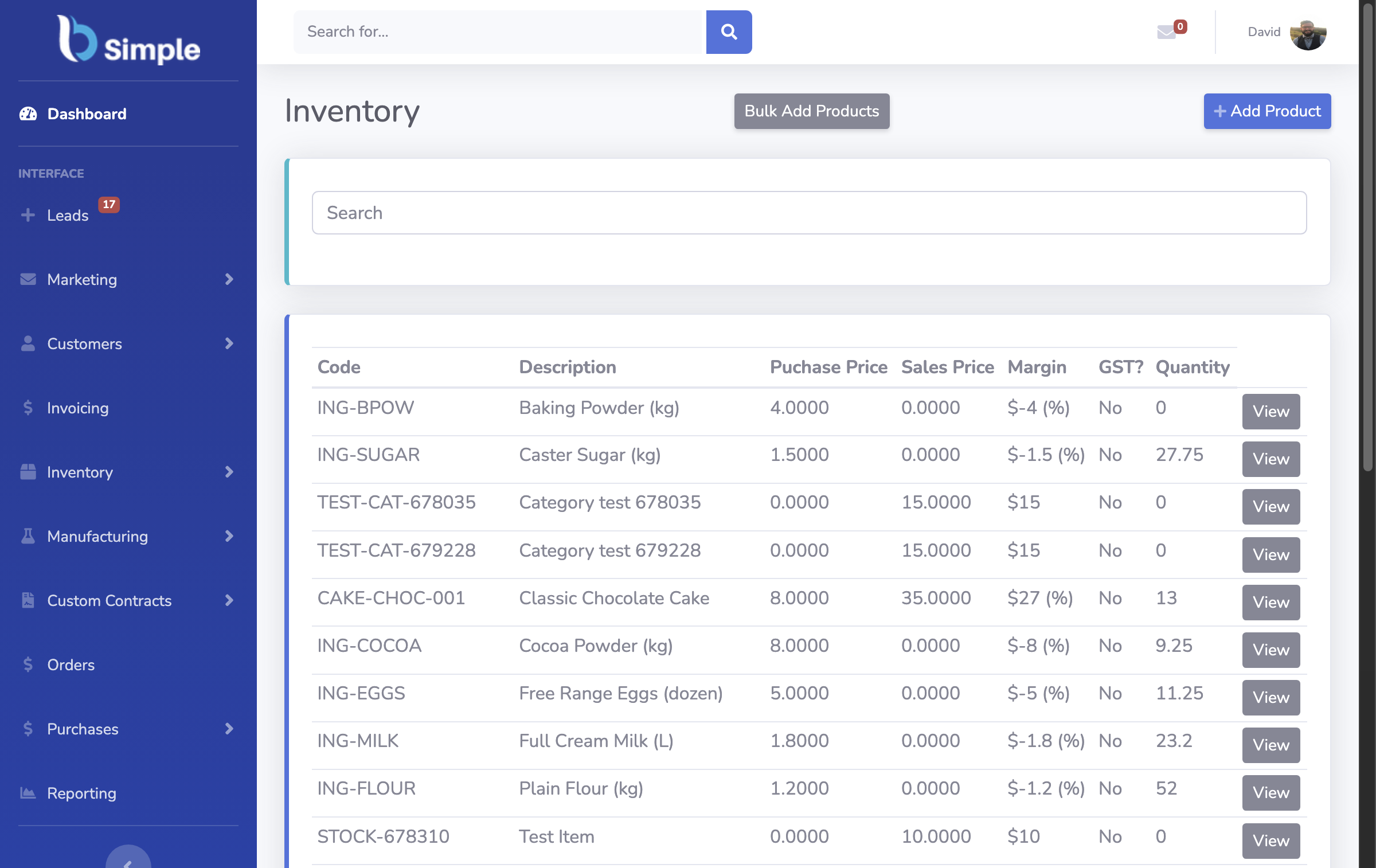
BSimple inventory management dashboard

Why Inventory Tracking Matters For Your Bottom Line

Let's talk about the practical methods for tracking inventory that actually work for small Australian businesses. The foundation starts with choosing the right approach for your operation, and it typically falls into one of several categories: manual tracking, spreadsheet-based systems, or dedicated inventory software.

Manual tracking works for the smallest operations—perhaps a single-location business with fewer than 50 SKUs. You're physically counting stock regularly, recording it in a notebook or simple ledger, and manually updating your purchasing decisions. It's labour-intensive and error-prone, but it's free and requires no technology. The problem? As you grow, this method becomes increasingly unreliable. A stocktake that takes one person a few hours becomes a full-day affair involving multiple staff members, and the data is only accurate at that single moment in time.

Spreadsheet systems are the next step up. Many Australian SMBs use Excel or Google Sheets to track inventory levels, create reorder points, and monitor stock movements. You can build formulas to calculate when to reorder, track multiple locations, and even integrate with your accounting system. The advantage is flexibility—you can customise exactly what you track. The disadvantage is that spreadsheets don't automatically update when stock moves. Someone needs to manually enter every sale, every purchase, every adjustment. This creates a constant lag between reality and your records.

Dedicated inventory management software, particularly solutions with Xero integration, eliminates this lag entirely. When you sell something, your inventory updates automatically. When you receive stock from a supplier, it's logged instantly. Your financial records stay perfectly aligned with your physical stock levels, which is essential for EOFY stocktakes and GST compliance. For most growing Australian businesses, this is where the real efficiency gains happen.

Talk to us

BSimple inventory control software

Setting Up Systems That Actually Work

The backbone of effective inventory tracking is establishing clear systems and processes. You need to know exactly what you're tracking, how you're tracking it, and who's responsible for keeping the data accurate. Without these fundamentals, even the best software becomes a garbage-in, garbage-out situation.

First, define your SKUs (stock-keeping units) clearly. Each distinct product variant needs its own SKU—a 500g bag of Ethiopian Yirgacheffe is different from a 1kg bag, and both are different from the espresso blend. Be specific about what constitutes a separate SKU, because this determines how accurately you can track demand and set reorder points. For manufacturing businesses, you might track raw materials, work-in-progress inventory, and finished goods separately, each with their own SKU codes.

Next, establish reorder points. This is the inventory level at which you automatically place a new purchase order. Calculate this based on your lead time from suppliers and your average daily sales. If a supplier takes 10 days to deliver and you sell 20 units per day, your reorder point should be around 200 units (plus a safety buffer). This prevents stockouts while avoiding unnecessary excess inventory. Many Australian distribution businesses use just-in-time inventory principles to minimise holding costs while maintaining service levels.

Implement regular stocktakes—not just the annual EOFY stocktake, but monthly or quarterly counts of fast-moving items. This catches discrepancies early when they're easier to investigate. A missing box of stock found in a monthly count is a minor adjustment; the same box missing from an annual count becomes a mystery. Stocktake management features in modern software make this process far less painful, allowing you to count stock on mobile devices and automatically reconcile against your system records.

Create clear receiving and dispatch procedures. Every item that comes in should be checked against the purchase order, scanned into the system, and allocated to the correct location. Every item that goes out should be picked, packed, and scanned to update your inventory. These touchpoints are where accuracy is built or lost. Warehouse staff need to understand that their actions directly affect the inventory data everyone relies on.

Learn more

BSimple order management interface

Technology Solutions That Fit Your Business

Technology has transformed what's possible for small business inventory management. The right tools don't just track what you have—they help you make smarter decisions about what to order, when to order it, and how to optimise your working capital.

Cloud-based inventory software offers several critical advantages for Australian businesses. First, it's accessible from anywhere—your warehouse, your office, your home, or even while you're visiting a customer. Your team can update inventory in real-time, and you get instant visibility into stock levels across all your locations. For businesses with multiple warehouses or distribution points, this is invaluable. A Sydney-based manufacturing company with a warehouse in Melbourne and another in Brisbane can see total stock, location-specific stock, and pending orders all from one dashboard.

Integration with Xero is particularly important for Australian businesses managing GST compliance and EOFY stocktakes. When your inventory system is connected to your accounting software, your balance sheet automatically reflects accurate stock valuations. There's no reconciliation nightmare at year-end, no surprises when your auditor reviews your inventory figures. The two systems speak to each other constantly, keeping everything aligned.

Automated purchase order generation is another game-changer. When stock reaches your reorder point, the system can automatically generate a PO to your supplier. For businesses with consistent suppliers and predictable demand, this eliminates the manual work of deciding when to order. You're never caught short, and you're not tying up excess cash in inventory that sits gathering dust.

Customer ordering portals transform how your wholesale and distribution customers interact with you. Instead of phone calls or emails, they log into a portal, see real-time stock availability, place orders, and track shipments. This reduces your administrative burden significantly and improves customer satisfaction—nobody likes being told an item is out of stock after they've already placed an order. Customer ordering portals also reduce order errors because customers are ordering directly from your live inventory system.

Negative inventory tracking is a feature that deserves special mention. This allows you to see when customers have ordered more stock than you currently have available, helping you identify demand spikes and manage backorders effectively. A Melbourne brewery might discover that a particular craft beer is consistently selling faster than anticipated, signalling the need to adjust production or increase supplier orders.

Register for a free trial

BSimple purchase order workflow

Frequently Asked Questions

What's the difference between inventory tracking and inventory management?

Inventory tracking is monitoring what you have—quantities, locations, and movements. Inventory management is the broader process of optimising those levels, setting reorder points, forecasting demand, and making purchasing decisions based on tracking data. Tracking is the foundation; management is what you build on top of it.

How often should small businesses do a physical stocktake?

At minimum, conduct a full stocktake annually before EOFY for accounting and GST purposes. However, best practice is monthly or quarterly counts of fast-moving items and a full count every six months. This catches discrepancies early and maintains data accuracy throughout the year.

Can I track inventory if I have multiple warehouse locations?

Absolutely. Cloud-based inventory software tracks stock by location, so you can see total inventory across all warehouses plus location-specific levels. This is essential for distribution businesses and manufacturers with multiple facilities, allowing you to optimise stock allocation and fulfil orders from the nearest location.

How does Xero integration help with inventory management?

Xero integration keeps your accounting records perfectly aligned with your physical inventory. Stock movements automatically update your balance sheet, COGS calculations are accurate, and EOFY stocktakes are simplified. There's no manual reconciliation needed, reducing errors and saving significant time during financial year-end.

What inventory data should I track for compliance purposes?

For Australian GST compliance and financial reporting, track opening stock, purchases, sales, closing stock, and any adjustments. Your inventory system should record dates, quantities, unit costs, and total valuations. This data feeds directly into your financial statements and is essential if you're ever audited.

How do I prevent inventory shrinkage and stock discrepancies?

Implement clear receiving and dispatch procedures, train staff on proper scanning and data entry, conduct regular cycle counts to catch issues early, and use lot/batch tracking for perishable items. Most discrepancies come from process breakdowns rather than theft—focus on getting your procedures right first.

What's a reasonable reorder point for my business?

Calculate reorder point as: (average daily sales × supplier lead time in days) plus safety stock. Safety stock depends on demand variability—add 10-20% for stable demand, 30-50% for volatile demand. Review and adjust quarterly based on actual sales patterns and supplier performance.