
Guide / scanning hardware
Zebra hardware and inventory software
Zebra makes excellent scanners, printers and mobile computers — and the question that matters is whether your inventory software accepts their input. Here is how the pieces fit, and where BSimple stands: browser-based, standard scanning, no hardware partnerships claimed.
The key facts
- Zebra sells hardware and device software, not the stock record — scanners, label printers, and Android mobile computers for warehouse use.
- The compatibility question is simple: does the scanner act as a keyboard (HID) into your software, and does the software run in a browser?
- BSimple's position: browser-based, so standard USB and Bluetooth scanners that type into any web page work — we do not certify specific Zebra models or claim a partnership.
- Where Zebra's own stack fits: large warehouses standardising on Android devices and their device software — a different tier of investment.
- Context: the full inventory system holds the wider system, this page one stop in it.
- 01The key facts
- 02What Zebra hardware actually does
- 03How scanning works with browser-based software
- 04Where BSimple sits — plainly
What Zebra hardware actually does
Zebra Technologies is the incumbent name in barcode hardware: handheld scanners, wearable and gun-style devices, label and receipt printers, and rugged Android mobile computers that run warehouse software on the device. Enterprises standardise on them for durability, scan accuracy and support. It is worth being precise about the layer they occupy, though: the hardware captures and prints; the stock record — quantities, orders, purchasing, invoicing — lives in whatever software the scan feeds. "Zebra inventory management software" usually means one of two things: Zebra's own device-side software tier, or third-party inventory systems that Zebra devices feed. The second is what most small and mid-sized businesses actually need to solve.
That distinction decides your shopping list. If you need rugged Android computers with custom device apps, you are in enterprise territory with enterprise budgets. If you need scans to land on a truthful stock record, the question is software-first: pick the record, then confirm the hardware talks to it.
How scanning works with browser-based software
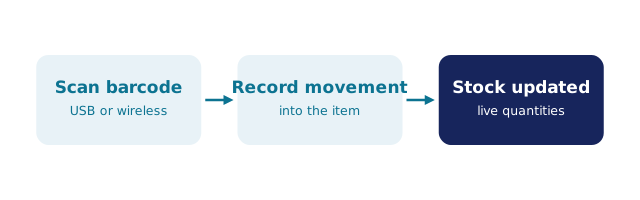
The common bridge between any scanner and any inventory system is HID input: the scanner "types" the barcode characters and an Enter key. A 1D or 2D scanner from Zebra — or any other maker — in keyboard mode works with any web page that has a field to type into, which is exactly how browser-based systems like BSimple accept scans: a scan becomes a stock movement on the record, and label printing runs through whatever printer driver your workstation already speaks.
The honest caveats: browser software does not drive every Zebra printer feature or high-throughput label run, and Android mobile computers usually want an app rather than a browser tab — for device-native deployments, Zebra's own software tier or systems built for those devices are the better match. But for the standard warehouse loop — receive, pick, count, with a scanner and a label printer — a browser record with HID scanning covers it without an integration project. The barcode management overview walks the workflow, and app-based scanning options cover the phone-as-scanner route.
Where BSimple sits — plainly
We build BSimple, so weigh that. It is cloud operations software — inventory, orders, purchasing, invoicing on one record — and it is browser-based, which is the property that makes standard HID scanners work regardless of brand. We do not claim Zebra partnership, certification, or device-specific integrations, and a vendor who implies such things without a stated program should be asked directly.
For wholesale, manufacturing and distribution businesses that want a truthful record fed by ordinary scanners — with batch trace search, stocktakes, reorder levels and an accounting handoff to Xero or MYOB — that is BSimple's ground, from $180/month AUD with everything in the core plans. The free trial is the practical test: plug in your scanner, scan your real barcodes, and see whether the record moves the way your warehouse does.
Frequently Asked Questions
Does BSimple integrate with Zebra scanners?
In the way that matters: BSimple runs in the browser, and Zebra scanners in keyboard (HID) mode type into any web page — scan, field receives, record updates. We do not claim model-specific certification or a partnership, either with Zebra or any hardware maker.
Does BSimple print labels to Zebra printers?
Printing runs through your workstation's normal print path; standard label printing from the browser works the ordinary way. Device-level driver features and high-volume print engineering are beyond what we claim — test your printer during the trial.
Do I need Zebra Android mobile computers for a warehouse?
Only if your volume and environment justify rugged on-device apps. Many warehouses run standard scanners into a browser record at a fraction of the cost. The warehouse scanning workflow shows the loop end to end.
What software drives the stock record while Zebra captures the scans?
That is the layer BSimple provides: one record of quantities, batches, orders and purchasing that the scans feed. Hardware captures; the record decides whether your quantities were ever true.
Can we test our existing scanners before buying?
Yes — the free trial runs in your browser with your hardware. Pair the scanner, open the record, scan a real barcode: if it lands correctly, compatibility is proven on your desk, not in a datasheet.

BSimple