
Guide / warehouse scanning
Warehouse barcode scanner systems
A warehouse scanning system is four parts: scanners, labels, connectivity, and the record every scan feeds. The first three are commodities — the fourth decides whether scanning creates truth or just noise.
The key facts
- Four components: scanners (dedicated or phone), labels, connectivity, and the stock record the scans post to.
- Warehouse-scale wins: receiving against purchase orders, pick validation at the shelf, and counts that do not freeze the building.
- Phone vs dedicated: phones read standard codes from the browser and start free; dedicated units earn benches where volume justifies speed.
- BSimple: browser-based scanning into the live record — no install, hardware-agnostic, from $180/month (AUD), free to trial.
- 01The key facts
- 02The four parts of a scanning system
- 03What scanning earns at warehouse scale
- 04How BSimple fits the warehouse
The four parts of a scanning system
Scanners. Dedicated units — corded at a bench, cordless in the aisles — read faster and survive drops. Phones read the same standard codes through the browser and cost nothing extra; most operations run both.
Labels. Product labels carry the barcode plus human-readable text; shelf and bin labels matter more than businesses expect — scanning a location, then the item, confirms the pick in two beeps.
Connectivity. Wi-fi reaches most warehouses; the honest question for any system is what happens in the corners it does not. Ask how offline scans sync before you buy, not after.
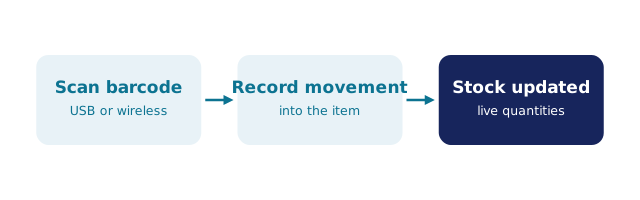
The record. The component that decides everything. A scan must post a transaction — receipt against the purchase order, pick against the order, variance at the count — to the same ledger the orders and invoices use. Scanning into a side list recreates the typing you were trying to delete. How barcode inventory works is the record-side view.
What scanning earns at warehouse scale
Receiving. The delivery is scanned against the purchase order; quantities update as they land, price variance is caught at the dock, and the bench never becomes a backlog of unposted boxes.
Picking. The scan validates the line at the shelf — wrong item, wrong bin, wrong quantity are refused where they cost nothing instead of at the customer where they cost everything. Multi-order picking stops being a memory exercise.
Counting. Cycle counts run by aisle while operations continue; a thousand lines in an afternoon is a normal outcome, and variances post as auditable adjustments. The scanner stocktake workflow and the wider scanning guide cover both in detail.
How BSimple fits the warehouse
We build BSimple, so weigh that. Scanning is native to the record, not a bolt-on: receive, pick, adjust and count by scan from any phone browser — no app-store install, no per-device licensing — with dedicated scanners working wherever they plug in. The scans feed the same ledger as purchasing, orders, the customer portal and invoicing, with the Xero or MYOB handoff behind it; the warehouse inventory guide covers the warehouse side of that record. Plans start at $180/month (AUD), and the trial is the honest test: label one bay, receive it, pick it, count it — a morning on your own floor.
Frequently Asked Questions
What do I need for a warehouse barcode scanner system?
Scanners (or phones), labels, wi-fi — and above all, a stock record the scans can post transactions to. The hardware is the commodity; the record is the system.
Do we need dedicated scanners, or are phones enough?
Phones are enough to start — any modern browser reads standard codes. Dedicated units earn their place at a receiving bench or high-volume pick faces where speed and durability pay. Both can feed the same record.
Does BSimple need software installed on the scanners?
No — scanning runs in the phone's or device's browser against the live record, with nothing to install or update. If your warehouse has genuine dead zones, test them honestly during the trial before committing.
Can scanning work without a warehouse management system?
Scanning without the record is just fast typing. You do not need a heavyweight WMS, but you do need a shared, live stock record — which is what BSimple provides, with the purchasing and invoicing workflow attached.

BSimple