
Guide / scan to record
Inventory software and barcode scanners
A barcode scanner is just a fast, accurate typist — the value comes from what the record does with what it types. Here is how scanning and inventory software fit together, and what hardware you actually need.
The key facts
- What a scanner really is: a keyboard that types a code plus Enter — which is why almost any scanner works with browser-based software.
- What scanning buys: speed (seconds per entry) and accuracy (no transposition errors) — the record updates the moment stock moves.
- The three workflows: receiving, picking/dispatch, and counting — the same scan-to-record loop in three directions.
- BSimple's approach: browser-based, standard USB or Bluetooth scanners, no proprietary hardware — and a trial to prove it with your scanner.
- 01The key facts
- 02What actually happens when a barcode is scanned
- 03The hardware question, answered simply
- 04How BSimple handles it
What actually happens when a barcode is scanned
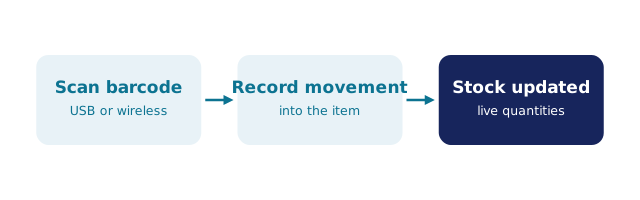
The scanner reads the pattern and types the characters into whatever field is focused, then sends Enter — nothing more mysterious than that. The intelligence is in the software: the record looks up the code, finds the product, and offers the movement that makes sense in context. Scan during receiving and the goods receipt increments; scan during picking and the order checks the item off and reserves the quantity; scan during counting and the stocktake compares what is on the shelf against what the record claims. One input mechanism, three movements, all landing on the same record with the operator and timestamp attached.
That is also why scanning improves accuracy as much as speed: the fat-fingered "13" that should have been "31" is the error a scanner makes impossible, and the error that stocktakes exist to catch. Fewer catches, truer record, less counting.
The hardware question, answered simply
You do not need a project. Any USB or Bluetooth scanner in keyboard (HID) mode — the default of the vast majority, from budget brands to rugged warehouse guns — works with any software that runs in a browser and has a field to type into. Labels come from a label printer or, to start, a sheet of printed labels and a plain-paper printer; the barcode is just a code the scanner reads. Mobile phones work too: the camera becomes the scanner with an app, and phone-based scanning covers that route.
The questions worth asking are about the record side, not the scanner side: does a scan update quantities live, with the operator and movement attached? Can it drive a pick list in sequence? Does a stocktake compare scanned reality against the record and show variances? The barcode workflow in warehouses walks those loops, and scanning from spreadsheets shows the pre-software version many businesses start with.
How BSimple handles it
We build BSimple, so weigh that: cloud operations software for wholesale, manufacturing and distribution — live quantities across locations, batch and expiry tracking, purchase orders from demand, order-to-invoice — where scanning is standard barcode input in the browser. No proprietary hardware, no scanner brand requirement, nothing to install: your existing scanner plugs in and types. The scan-to-record loop covers receiving (goods receipt updates quantities), picking and packing (orders checked off against the record), and stocktakes (count-review-adjust with variances surfaced). Batch trace search adds the traced layer — the barcode management overview shows the machinery in full.
Plans run $180/$250/$399 per month AUD with everything in the core plans. The trial is the test that fits on a desk: plug in your scanner, scan one of your products, and watch the record move.
Frequently Asked Questions
Do I need special barcode scanners for BSimple?
No — any USB or Bluetooth scanner in keyboard mode works, because BSimple runs in the browser and a keyboard-mode scanner is, to the browser, a keyboard. Your existing scanner almost certainly qualifies; the trial proves it in a minute.
Do our products need barcodes already?
Either print your own labels (a label printer, or label sheets from a normal printer) or use supplier barcodes where they exist. The system reads standard barcode symbologies; generating codes for unlabelled stock is part of the setup.
What does scanning change in daily work?
Receiving, picking and counting all become scan-first: quantities update the moment the movement happens, with the operator and timestamp on the record. The counting pain shrinks because the record stops needing to be corrected.
Can phones scan instead of scanners?
For lighter use, yes — camera-based scanning apps cover the occasional count or lookup. For a warehouse bench, a dedicated scanner is faster, cheaper than a phone fleet, and harder to lose. The app route covers the trade-offs.
How do we test this on our own stock?
Start the trial, plug in your scanner, import a few products, and run one receive and one pick. If the scan lands and the record moves, the hardware question is closed for the cost of an afternoon.
BSimple