
Guide / codes and records
QR codes and inventory management
A QR code is a barcode with a bigger vocabulary — more data, phone-camera friendly, and good at pointing a human somewhere. For the stock record, what matters is what happens after the scan. Here is the honest picture.
The key facts
- QR vs 1D barcode: QR carries far more data and scans with any phone camera; 1D barcodes are simpler, cheaper to print at volume, and the warehouse standard.
- The rule that matters: whatever the code contains — product code, serial, URL — the value comes from the record resolving it to a movement.
- Phone scanning: genuinely useful for light use and lookups; dedicated scanners stay faster for volume benches.
- BSimple's position: standard code input in the browser — a QR encoding a product code scans exactly like its barcode equivalent; no URL-to-record claims beyond the code's contents.
- 01The key facts
- 02What QR codes actually add
- 03The part that matters: what the record does with the scan
- 04Choosing codes without the brochure
What QR codes actually add
Two properties, mostly. Capacity: a QR holds hundreds of characters against a 1D barcode's couple of dozen — enough for a product code plus serial, batch and date in one label, which is why QR dominates asset tags, equipment plates and traceability labels where one scan should identify the whole story. Camera readability: any phone scans a QR without an app, which makes it the code of consumer-facing use — a QR on a case that opens the product's trace or spec page is a human convenience, not a record movement.
The trade-offs are equally concrete: QR labels are physically larger for the same scanning distance, and high-volume warehouse benches still favour 1D scanners for speed and durability. The two coexist happily: 1D on the shelf edge, QR on the asset plate — or both on the same label, encoding the same code.
The part that matters: what the record does with the scan
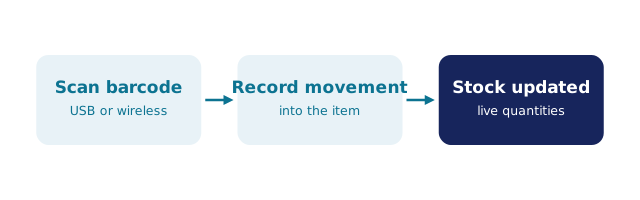
A code is an address; the record is the building. Scanning a QR that encodes a product code should do exactly what scanning that product's barcode does — resolve to the item and offer the movement in context: receipt during receiving, pick during picking, count during a stocktake. Scanning a QR that encodes a URL is different: it moves a human to a web page, which is useful for people and irrelevant to a stock record unless the system behind that URL is the record itself. Marketing copy often blurs this line; the honest check is to ask what the scanned characters are and which system turns them into a quantity change.
We build BSimple, so weigh that: it runs in the browser and accepts standard code input — keyboard-mode scanners and, for lighter use, phone-camera scanning. A QR label encoding a product code behaves identically to the 1D barcode of the same code; the record — live quantities across locations, batch and expiry tracking, order-to-invoice — is what turns either into inventory management, from $180/month AUD. Free QR-code inventory tools cover the free end, and the barcode management overview the machinery.
Choosing codes without the brochure
- 1D barcodes for shelf and bench: smallest label, fastest high-volume scanning, universal supplier compatibility.
- QR for identity-dense labels: assets, equipment, traceability tags — one code carrying serial, batch and date, readable by any phone.
- One code, one meaning: decide what each code encodes (a product code, not a marketing URL) and keep it consistent across labels.
- Judge the record, not the shape: the trial test is identical for both — scan one of your products and watch the record move. Start here.
Frequently Asked Questions
Can BSimple read QR codes?
In the sense that matters: a QR encoding a product code types that code into the browser exactly like a barcode scanner does, and the record resolves it the same way. We do not make URL-to-record claims beyond the code's contents.
Are QR codes better than barcodes for inventory?
Different, not better: QR wins on capacity and phone readability; 1D barcodes win on label size and high-volume scanning speed. Most warehouses use both, each where it fits.
Can we scan QR codes with a phone?
Yes — any modern phone camera reads QR without an app, which suits lookups and light counting. For volume benches, dedicated scanners are faster and tougher; the app route covers the trade-offs.
What should our QR labels contain?
For stock purposes, the product or item code your record resolves — optionally plus serial or batch for trace-dense labels. A URL is a human convenience; decide per label which job it does.
How do we test QR scanning with BSimple?
Start the trial, print a QR encoding one of your product codes, and scan it with your phone or scanner into the browser. If the record resolves it, the question is closed for the cost of one label.

BSimple